


Fundamentals of Low-Code Development

What is a Low-Code Development Platform (a.k.a. HP aPaaS)?
Low-Code Development Platforms are also called HP aPaaS, High-Productivity Application Platform as a Service — a term coined by Gartner. Gartner suggested the following feature set for HP aPaaS (Gartner, Market Guide for High-Productivity Rapid Application Development Tools, May 24, 2016).
Model over Code: Best-in-class HP aPaaS's are agile, visual model-driven, low-code development platforms. A best-in-class HP aPaaS allows developers to design UI that directly enables CRUD, to integrate SOA services and applications using SOAP/REST APIs, to create, access, and update RDBMS/NoSQL based on a domain model (UML class diagram) through APIs without coding, and to specify and automate business processes and logic using BPMN.
Mobile Responsive Web: It allows developers to design server-side and client-side control logic for a single-page, responsive web UI that automatically adjusts across devices such as smartphones, tablets, and PCs.
Low Code Support: It allows developers to extend models with scripting languages, 4GL, or 3GL.
One-Button Application Deployment: It allows developers to perform CI, CD, and DevOps automatically with a single click, even with their existing toolsets (e.g., Jenkins, GitLab) integrated.
One-Button Revision Control: It allows developers to enjoy a single, managed view with point-in-time revision control for all software assets in the development project.
Live Prototyping: It allows developers to integrate prototyping directly into the UI design process.
Runtime Platform Support: It allows developers to deploy applications across multiple public cloud services, private clouds, or on-premises servers. It supports containers as well, including Docker and Kubernetes.
Service-Oriented Architecture: It allows developers to expose and consume REST and SOAP APIs for service composition and app integration.
Smart Application Connectors: It provides drag-and-drop adapters for well-known apps such as CRM and ERP.
Collaborative & Social Development: It provides agile project management and team collaboration tools, private & public developer portals, communities, and app stores.
App Management and Analytics: It provides app management, traceability, and built-in real-time analytics for reporting on application usage and potential performance issues.
Figure 1 shows HP aPaaS vendors in 2017 (Forrester Wave™: Low-Code Development Platforms For AD&D Pros, Q4 2017). OutSystems, Mendix, and Appian are leading vendors. Gartner predicts that by 2020, at least 50% of all new IT line-of-business applications will be created with HP aPaaS toolsets (Refer to Gartner, Market Guide for High-Productivity Rapid Application Development Tools, May 24, 2016). MarketsandMarkets predicts that the HP aPaaS market size will grow from USD 3.20 billion in 2016 to USD 27.23 billion by 2022, at a Compound Annual Growth Rate (CAGR) of 44.49% during the forecast period. Figure 2 shows that HP aPaaS is now a very mature technology that companies can adopt without hesitation.

Figure 1. Low-Code Development Platforms (Adopted from The Forrester Wave™: Low-Code Development Platforms For AD&D Pros, Q4 2017)

Figure 2. PaaS Hype Cycle (Adopted from Gartner, Hype Cycle for Platform as a Service, 2018)
Who should consider HP aPaaS, and why?
As is true of all profound IT changes, the apparent revolution in computing we see today (including mobile, social, cloud, big data, IoT, AI, blockchain, etc.) is, in fact, a synergistic aggregation of evolutions across multiple well-established technology directions. For enterprises to successfully adopt new technologies, they need to effectively integrate their existing technologies with the new ones. Companies that have not updated their technology and skill portfolios to absorb advances in IT across all avenues will fail to capture value from new technology adoption because their current inventory of technologies, skills, and practices conflicts with the assumptions underlying and the ingredients comprising the new technologies. To summarize, they fail to synthesize existing and new technologies, skills, and practices.
We recall that many companies bought and implemented SAP ERP (then called R/3) instead of building their custom solution when the computing paradigm shifted from mainframe to client/server in 1990s. Client/server computing brought in a whole new collection of technologies, such as desktops, servers, Unix, RDBMS, LAN, distributed computing, middleware, RPC, Windows GUI, object-oriented programming, component-based development, RAD, IDE, etc. Companies that used mainframe computers for centralized, batch, and online transaction processing had to master a large number of new tools, skills, and practices to migrate their mainframe legacy apps to client/server environments or build innovative new apps using client/server technologies. Because there were too many values from shifting their mainframe-based IT to client/server, they had to go after client/server, but few of them were ready to do that from scratch. This is why many of them chose already-synthesized client/server apps such as SAP R/3.
How many companies today are technologically mature enough to synthesize a creative digital business through fast release and adaptation cycles? To be ready, they should have built a solid foundation in object-oriented design and programming, model-driven design, BPM, SOA, responsive UI development, XP, agile development, and related areas. Successful digital businesses are well-equipped for microservice architecture, cloud-native app development, DevOps, containers and their orchestration, IoT, analytics, AI, etc. — all built on the solid foundation mentioned above, diligently built over the past 20 years.
There are more companies that are not technologically ready than those that are. For those who are not ready, it is risky to now strengthen various technical ingredients established in the 1990s or 2000s while also catching up with new technologies that emerged in the 2010s, and then synthesizing them to create a new digital business model. This is why many companies turn to HP aPaaS—an already-synthesized digital business platform that even a non-technical business person can use to build a digital business app of her imagination after some intensive training in modeling. Even a technologically mature company with its IT professionals well trained in new technologies may utilize an HP aPaaS for developing Mode 2 apps, because it can dramatically reduce time to market compared with HC (High-Control) aPaaS or more conventional app development platforms.
In the next section, I introduce one of the best HP aPaaS offerings on the market, Mendix.
Mendix
Mendix is one of the best HP aPaaS as shown in Figure 1. It implemented pretty much all of the desirable functionalities and architecture of HP aPaaS listed in the previous section. It is currently used by 60,000+ developers. In August 2018, Siemens acquired Mendix for €0.6 Billion to accelerate the adoption of MindSphere (Siemens' IoT platform) and 10x faster application development.
I am not a Mendix expert. I just started exploring it and developed a simple app based on a Mendix-provided learning path called "Become a Rapid Developer 2018". I will share my experience developing that simple app using Mendix because, I believe, doing so can give you an easy introduction to the HP aPaaS.
Both Mendix and OutSystems offer free community editions of their platforms. I used the free edition of the Mendix platform to build a sample app. The free edition includes everything you need to design, build, and deploy demos, prototypes, or small applications. It includes a deployment environment for each application, providing access to up to 10 internal users. You just sign up, get started right away, and build as many applications as you want.
Mendix App Development Exercise (I)
Mobile App to Develop
The app I am developing is for managing a public training business and contains a subset of functionalities of the Public Software Training app that is analyzed in the Business Analysis page in this blog site.

Figure 3 shows the home page of the LearnNow Training Management app.


Figure 3. Home Page of LearnNow Training Management App
Domain Model
I started by designing the domain model using the Mendix Web Modeler —a no-code, web-based application development environment. Figure 4 shows the domain model, which includes the Course, TrainingClass, Teacher, Location, Trainee, and Registration classes, along with the associations among them.
The domain model in Mendix uses only simple associations (i.e., 1:1, 1:N, M:N) and generalization (i.e., superclass-subclass associations). Other types of associations in UML (e.g., qualified association, association class, aggregation, composition, categorization) should be transformed to simple associations, sometimes using a system-generated identifier.
As I mentioned earlier, I have not studied Mendix thoroughly enough, so there may be errors in my statements about it. I hope Mendix experts out there will correct any errors on this page.

Figure 4. Domain Model of LearnNow Training Management App
User Stories
Next, user stories are ideated for the domain, which are to be validated by users. High-priority stories are selected into the sprint backlog and scheduled on the task board as shown in Figure 5. User stories can be identified through customer-obsessed, adaptive requirements analysis approaches such as design thinking and lean UX.
When developing a complex, large-scale business application, the developers often need to design the overall business architecture (e.g., using TOGAF ArchiMate) and design a hierarchy of relatively high-level business processes using BPMN 2.0. In this case, the leaf-level tasks are transformed to user stories, as explained earlier in the Business Analysis page on this blog site.


Figure 5. User Stories and Scrum Task Board
Class Responsibility Assignment
Let's consider a user story that goes: "As an administrator, I want to be able to schedule a training event more efficiently, so that I spend as little time as possible on this." The classes responsible for implementing this user story must be identified, as shown in Figure 6. Course, TrainingClass, Teacher, and Location classes are required to realize the user story.


Figure 6. Class Responsibility Assignment for the User Story
UX Design
The user experience for scheduling a training class is designed next. We will have the course administrator select a course from the course list page and schedule a class for it. Therefore, the UI for class scheduling is designed as shown in Figure 7.
Mendix provides a UX design framework called Atlas UI that makes building elegant user experiences a rapid process. The UI design process is simplified with ready-made page templates, building blocks, and widgets that can be arranged and customized to suit your app. Atlas UI is built to be fully responsive. Mendix Atlas UI is completely open source and accessible on GitHub. The framework leverages Bootstrap & Sass.

Figure 7. UX Design for Class Scheduling
Logic Design
Application logic is created in Mendix as microflows, which use a subset of the BPMN 2.0 notation. You can drag microflows and pages into a microflow, extract and use sub-microflows, extend a microflow with the Java Action Call, etc. The Java action call activity can be used to call a Java action. Arguments can be passed to the action, and the result can be stored in a variable.
Figure 8 shows how the logic is designed for the action to be triggered by pushing the Add button in Figure 7. The logic is designed as a Microflow (i.e., a discrete business process)in BPMN 2.0. The process first creates a Course object and then displays an empty page where the user can enter values for the Course class's member variables. Figure 9 shows the logic design for the Detail button, which displays detailed information about the selected Course. The button simply opens a page that displays attribute values of the selected Course object.
Figure 10 shows the logic design of the Schedule button, which allows the administrator to create a new TrainingClass for the selected Course. The Schedule button triggers a microflow. The microflow, when triggered, receives a parameter, i.e., an input data, of type object--in this case, a Course object. The microflow first creates a TrainingClass object whose Course variable represents the Course linked via the TrainingClass_Course association in the domain model in Figure 6. It then displays an empty page where the administrator can input values of the member variables of the TrainingClass class. The Course variable is prefilled, however, on that page with the input parameter value.

Figure 8. Logic Design for the Add Button in the Course List Page

Figure 9. Logic Design for the Detail Button in the Course List Page

Figure 10. Logic Design for the Schedule Button in the Course List Page
One-Click Deployment
Once you have completed implementing a user story, you can click the Publish button in the Web Modeler menu to build and deploy the incremented app on the public Mendix Cloud for free. Yes, one click is all it takes to enable continuous integration (CI), continuous deployment (CD), and DevOps. You don't need to worry about Cloud Foundry, Docker, Kubernetes, etc., even if those technologies are in fact employed by the Mendix platform. If you use the Enterprise edition of the Mendix platform, you may deploy your app on your subscribed cloud services, such as IBM, SAP, Azure, AWS, Pivotal, or your private cloud, or on-premises servers.
App Services and App Store
You can publish app data (i.e., classes) and functionality (i.e., microflows) as SOA services (Mendix App Services, REST Services, or Web Services) within your enterprise or to the entire Mendix community. Users of your app service can directly drag and drop the actions you designed into their microflows and use your classes (a.k.a. entities) in their projects. All that without worrying about web services, XML mappings, or schemas!
The Mendix App Store contains many useful and reusable widgets and modules created by Mendix as well as by its partners and customers. The Mendix community downloaded more than 3500 items from the App Store in the past year and is uploading 50 new or updated items every month. The App Store is completely integrated with the Community Profile, so you can find out information about who developed the item you are downloading. Mendix offers a private App Store limited to your company, and a public App Store open to all Mendix Community developers. You may license your app services, allowing consumers to download them into their Desktop Modeler, or just advertise them without allowing download.
Microservice Architecture in Mendix
Microservices offer a software architecture that is well-suited to small Agile DevOps teams. This architecture is best suited to benefit from the qualities of containers. Containers enable you to deploy your application to any cloud in an automated fashion, ensuring quality, repeatability, and speed. Deployment standardization enables a small DevOps team to handle all operations.
Within the Mendix Cloud, the logical term “app container” is used to describe the application isolation. Each application is fully isolated from other apps in terms of computing, memory, and storage. A Mendix app runs in one or more containers, with each container supporting only a single application. Also, for each application, a dedicated database and S3 bucket are provisioned to provide full isolation at the data level.
Designing microservices with a full stack (from UI to DB) in a single deployable will minimize the impact of change. The business process is usually the best basis for dividing a functional scope into good microservices. So, you should involve business owners and process architects to define the microservice architecture.
The teams and the architecture can be aligned with the business functions they support, achieving maximum autonomy to evolve easily and generate value. So, the size of a microservice and a DevOps team can be small or large, depending on the size of the business function, but not too large. (Forget about the word “micro,” but keep the team size ≤ 10.)
Mendix App Development Exercise (II)
Let's develop another user story in the LearnNow Training Management app. Consider a user story that goes: "As an administrator, I want to be able to add registrations from my mobile phone, so that I can add registrations while traveling."

The classes responsible for implementing this user story must be identified, as shown in Figure 11. All classes in the domain model shown in Figure 4 are required to implement the user story.

Figure 11. Classes Responsible for the User Story
The user experience for registering a trainee for a training class is designed as shown in Figure 12. We want to allow the course administrator to select a training class on the training class list page, register a trainee in that class, and display the list of all trainees registered in that class.
Logic design for the Add button is similar to Figure 8; that for the Class Detail button is similar to Figure 9; and that for the Register a Trainee button is similar to Figure 10. The logic design for the List Registered Trainees button is given in Figure 13. The button triggers a microflow containing a single activity that displays the list of trainees registered for the training class. The training class under consideration is input as a parameter to the microflow. The microflow then opens the Training_Class_Registration_List page. This page contains a text description of the training class under consideration and a list view of all current registrations for the class. The list view retrieves all objects of the Registration class from the database, as defined in the domain model in Figure 11.

Figure 12. UX Design for Trainee Registration in a Training Class

Figure 13. Logic Design for the "List Registered Trainees" Button in the "TrainingClass List" Page
You may view and test the LearnNow Training Management app on a mobile device. Download the Mendix Mobile App for iOS or Android from: https://docs.mendix.com/refguide/getting-the-mendix-app. Select "Scan QR code" from the menu of the Mendix Mobile App, then scan the QR code provided here. Then the Mendix app is instantly started on your mobile device.
Mendix ORM and Database
Mendix ORM generates DDL upon deployment of your app, which automatically creates the correct database schema based on your domain model. It stores persistent classes in your domain model in the database of your choice. You can define security rules and validation rules for each class. Whenever you change your domain model, Mendix automatically updates the database schema and migrates your data to the new schema. Mendix supports many database servers, including MySQL, MariaDB, PostgreSQL, Microsoft SQL Server, Microsoft Azure SQL Database, Oracle Database, and IBM DB2.
Mendix offers a number of ways to specify queries: (1) Both the Desktop Modeler and Web Modeler offer visual ways to specify your query needs; (2) To retrieve specific objects or a set of related objects, you can use XPath expressions; (3) For reporting needs (where aggregation and the joining of multiple entities into a single result set is important), Mendix offers OQL queries. Under the hood, all queries are first translated into XPath, then into OQL, and finally into database-specific SQL statements. You may use a stored procedure in the database of your Mendix application via the Mendix Java API. You may also use JDBC to execute SQL statements on your Mendix app database. If you are using an external database, such as the legacy database in your company, you can use the Database Connector (e.g., Oracle Connector) add-on available in the Mendix App Store to support DBMS-specific features such as table APIs, stored procedures, packages, ref cursors, and user-defined types.
Mendix handles transaction management as well. Every request to the Mendix Runtime automatically starts a new transaction. Upon successful completion of the request, the transaction is committed with all related data. In the event of an error, all data changes are rolled back by default. You can provide custom error-handling logic to override this default behavior.
Mendix Architecture
Figure 14 shows an overview of Mendix architecture. I will try to elaborate on Mendix's internal architecture and mechanisms as I learn more about the platform. So far, Mendix looks to me like an impressive product, trying to balance prefabricated, pattern-based automation to make software development easier and faster, with openness to harmonize the platform with the fast-changing global software ecosystem. Conventional RAD tools were more closed and opaque. Mendix should be complimented for its openness.

Figure 14. Mendix Architecture (Adopted from David Ramel, Mendix App Platform Integrates with PhoneGap for Cross-Platform Mobile Development, 10/21/2014)
Figure 15 shows key components of the Mendix platform (https://www.mendix.com/evaluation-guide/enterprise-capabilities/platform-architecture). The Mendix Platform is a completely integrated aPaaS offering for designing, building, deploying, and managing enterprise apps. Go to the following link to see how Mendix apps satisfy the Twelve-Factor App requirements for SaaS: https://www.mendix.com/evaluation-guide/enterprise-capabilities/twelve-factor-architecture.
The platform is accessible to developers and administrators through the Developer Portal, which provides access to apps and services for requirements and development, and the Cloud Portal for operations and administration of apps and app services. The platform includes both the Desktop and Web Modeler. The Desktop Modeler and Web Modeler are the multi-user modeling studios of the Mendix Platform. The general purpose of the Modelers is to provide an integrated, unified modeling space where business analysts and IT engineers can work closely together to model the various application elements. The Desktop Modeler runs locally on the developer’s computer and includes an integrated build service that enables full offline operation, while the Web Modeler is hosted on the Mendix Cloud. Mendix Cloud is a PaaS-based cloud offering based on Cloud Foundry technology that runs on the IaaS layer of Amazon Web Services. A Mendix application will run in a container provided by Cloud Foundry. For the database, Mendix Cloud uses RDS PostgreSQL, and for file storage, it uses S3. Mendix App Store features hundreds of publicly available building blocks to speed up development. The Mendix App Store can also be configured for private use, so that apps and building blocks can be shared across your organization. The platform features online collaboration amongst users through the Dev Portal, Mendix app, and both modelers.

Figure 15. Key Components of the Mendix Platform
Mendix reminds me of Cool:Plex, which I used to develop a web application in 1999. Samsung funded me to develop a Partner Relationship Management app. I was a professor at the University of Iowa at the time. I set up a lab with 5 software engineers and collaborated with the HON Company (the second largest office furniture manufacturer in North America, headquartered in Muscatine, Iowa) to develop the PRM using COOL:Plex. (See Figure 16 for COOL:Plex's pattern-based design.)
COOL: Plex was originally called Obsydian and was developed by Synon. Sterling Software acquired Synon in 1998 and renamed the product COOL:Plex. CA (formerly Computer Associates) acquired Sterling Software in 2000 and renamed the product to CA Plex. CA is the current distributor of the product.
Obsydian is regarded as the pioneer of so-called Architected Rapid Application Development (ARAD) tools. ARAD is based on object-oriented analysis and design, and incorporates analysis and design patterns, frameworks, and models, typically reducing coding efforts by 50-70%. Mendix seems a descendent of ARAD tools, but made significant improvements by incorporating new advanced technologies and practices such as business process management (BPM), responsive Web design patterns, service-oriented architecture/microservice architecture patterns, ORM patterns and frameworks, extreme programming (XP), agile development, social development, app store, PaaS/IaaS, container, continuous delivery (CD), DevOps and real-time monitoring/analytics.
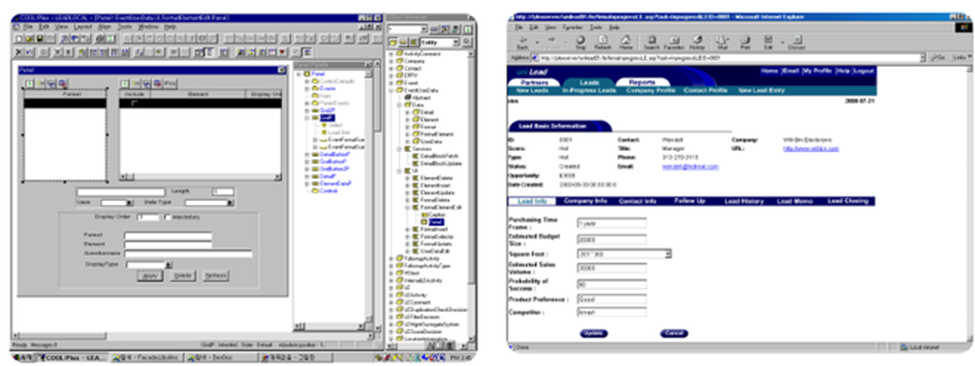
Figure 16. COOL:Plex' Pattern-Based Design
Figure 17 shows the IT Market Clock for Application Development published by Gartner in 2013. AMD SODA (Architected Model-Driven Service-Oriented Design of Applications) pursues 100% code generation based on shared business and IT modeling standards. I would place the current Mendix in this category. CASE/Code Generator (such as IEF, Composer) in 1980-90s also pursued model-based 100% code generation, but was based on structured analysis and design or information engineering. ARAD, based on object-oriented analysis and design, and pursuing pattern-based development, such as Obsydian, appeared in the mid-1990s. ARAD SODA (Architected Rapid Application Development Service-Oriented Design of Applications) came out in the mid-2000s by vendors like IBM, Microsoft, CA, Artisan, Interactive Objects, Mendix, MID, Wyde, etc., trying to reduce the learning curve and increase productivity of Web developers making the transition from traditional client/server to service-oriented development of applications. HP aPaaS, like Mendix, now supports model-based, pattern-based, and service-oriented application development with minimal to no coding, for deployment in PaaS+IaaS DevOps environments.

Figure 17. IT Market Clock for Application Development 2013 (Gartner)
Mendix Challenges
In this section, I would like to discuss the challenges that arise when we use Mendix to develop a digital business.
Multitenancy Support
As I am only a beginner user of Mendix, I have not faced any serious challenges so far. However, one of the challenging questions I heard is about how Mendix supports multitenancy. Is it easy to build a multitenant SaaS using Mendix compared to other platforms such as Force.com and Apprenda? (Refer to: https://developer.salesforce.com/page/Multi_Tenant_Architecture and https://apprenda.com/platform/features/multi-tenancy-enablement/)
Mendix Platform Evaluation Guide (https://www.mendix.com/evaluation-guide/enterprise-capabilities/runtime-security#5-how-does-my-mendix-app-support-multi-tenancy) explains the following about multitenancy support: Multi-tenant apps in Mendix share the same database, application logic, and user interface. However, application logic can be extended with tenant-specific logic, and the UI can be styled per tenant. Multi-tenancy can be implemented as follows:
Define a tenant-aware object model for the application. Tenant-level access to domain objects is configured using XPath definitions, which restricts access to those application object instances for the company to which the end-user belongs.
Define tenant-specific microflows and configure access rights to implement tenant-level application and process logic.
Apply tenant-specific styling of the UI by making the CSS dependent on the companies defined in the MxID.
Tenants can also be custom-defined in the application using identifiers such as division, country, and site.
I posed a question to the Mendix community regarding the multitenancy support. I got answers from a couple of Mendix experts. Here's a summary of what they said: Mendix does not have an out-of-the-box multitenant model — i.e., it's not a simple on/off model; you have to define multitenancy for every entity in your application. The term "multitenancy" is quite generic but is often used to refer to very specific requirements. It all comes down to how you design your application. However, you can generally implement multitenancy in Mendix by applying security models correctly. There are helpful things in the app store that help with building a multitenant app: e.g., an administration module that supports multitenants (https://appstore.home.mendix.com/link/app/80498/); a nice widget that allows you to have multiple themes in your project, allowing you to switch between themes based on which user a company is from (https://appstore.home.mendix.com/link/app/106033/), etc.
Process Orchestration & Choreography
Mendix uses BPMN models called Microflows to specify application logic inside a microservice. BPM/SOA platforms (shown in Figure 18 adopted from Gartner, Magic Quadrant for Intelligent Business Process Management Suites, 2017) support BPMN-based orchestration of SOAP, REST and micro services. The microservice architecture prefers choreography over orchestration, typically using publish-and-subscribe, event-driven messaging.
A challenging question regarding Mendix is what Mendix does or will likely do in the near future to help developers implement business process orchestration and choreography involving many micro, REST, and SOAP services, internal and external to the Mendix platform? I posed this question to the Mendix Community, and a Mendix expert answered, "You really shouldn't think of Mendix as a BPM tool. Instead, think of it as an abstraction of Java: Mendix is a general-purpose programming language with a pretty user interface. Microflows have much more in common with a Java method than with a BPMN model - even if they look more like the latter." I tend to agree with him. I would rather use the free edition of BizAgi Studio to prototype a complex workflow or orchestration-driven business applications. If we compare Figures 1 and 18, we can find quite a few overlaps between the two categories — viz., Appian, BizAgi, K2, AgilePoint, and PNMSoft are both iBPMS and HP aPaaS. This means that many HP aPaaS use BPMN as a basic modeling notation (for business process orchestration modeling or for application logic design), and many BPM suites have become agile, model-driven low-code development platforms.
Capgemini seems to have performed process orchestration, integrating Mendix apps with SAP SOA services. And it seems to contribute to CORA (Common Reference Architecture) to further advance BPM/SOA directions in the face of new types of SOA services, such as microservices generated by HP aPaaS like Mendix. Can we use BizAgi to orchestrate microservices developed in Mendix? I will have to test this.

Figure 18. Intelligent Business Process Management Suites (Gartner 2017)
BizAgi
We will now look at what it is like to build an application using a HP-aPaaS, which is also a BPM Suite. We will use the free edition of BizAgi Studio here. A quick overview of app development with BizAgi is available in this video: https://www.youtube.com/watch?v=HgBw_Eu98uA.
Process Model: BizAgi begins app development with process modeling. Figure 19 is the process model of the Equipment Loan process drawn using BizAgi Modeler.

Figure 19. Equipment Loan Process Modeled by BizAgi Modeler
Domain Model: The next step is to design the domain model, which contains all classes needed to run the process, as shown in Figure 20.

Figure 20. Domain Model for Equipment Loan Process
UI Model: Once the process model and the domain model are designed, we can design the UI for each user task in the process model by mapping class attributes in the domain model to UI controls. Figure 21 shows that domain model-to-UI mapping for each user task.

Figure 21. Domain Model-UI Mapping for User Tasks
Business Rules: Next, decision rules at each gateway are specified. Each outgoing sequence flow from an exclusive or inclusive OR gateway is described by a Boolean condition.
Process Automation: Actions can be defined to be automatically triggered on Enter, Save, or Exit of a process task, automating the process as much as possible. Figure 22 shows the business rules specified for the two gateways, along with an action for the Request Equipment Loan task that sets the Request Date to Today.

Figure 22. Business Rules and Automated Actions
Workflow Automation: A user task is automatically assigned to an actor corresponding to the lane containing the task. When more than one user qualifies the actor profile of the given task, a pre-selected allocation method, such as load balancing, is applied. The work portal shows which user is responsible for performing a specific case (instance) of a task. Users have login credentials. The BizAgi platform can be integrated with any existing IAM directory or can create its own user directory and profiles.
SOA Service Orchestration: A service task, such as the Check Equipment Availability task, calls a SOAP web service API of an external system, such as an ERP system. Figure 23 shows a specification of a SOAP web service and its input and output parameters mapped from the domain model.
External System Integration: Another service task of Notify Equipment Delivery in the process model is implemented by defining an automated action, as shown in Figure 22. In this case, an On Exit action is specified to send out an email to the Requester's Email address defined in the domain model. The subject line and main body of the email may include any attribute from the domain model. Figure 23 shows a specification of the email send action.

Figure 23. Service Orchestration and External Systems Integration
Comparison between Mendix and BizAgi
Both Mendix and BizAgi fundamentally apply the same software modeling principles. But the recommended modeling process and the applied model patterns differ slightly.
Mendix starts with (1) a domain model, (2) identifies user stories desirable in the domain, (3) designs the UI for each user story, and then (4) specifies logic to be executed for each UI control. The logic often involves microflows expressed in BPMN and can call SOA APIs.
BizAgi, on the other hand, starts with (1) a business process model and (2) defines the domain model to completely support the process model. Then it designs different kinds of flow objects in the BPMN model (not in a particular order): (A) it designs the UI for each human-workflow task (called User Task in BPMN terminology); (B) it specifies the SOAP web services for each straight-through processing task (called Service Task in BPMN terminology); (C) it defines business rules for each exclusive or inclusive gateway; (D) it specifies automated actions for some tasks.
Figure 24 compares the software modeling approaches of Mendix (on the LHS) and BizAgi (on the RHS) based on Figure 14: Metamodel of Software Requirement Models in the Business Analysis page on this blog site. Notably, both Mendix and BizAgi apps are built on the domain model. Relatively speaking, Mendix's app development is UX-driven, whereas BizAgi's is process-driven. In Mendix, the semantic architecture of a domain model is reflected in the UI architecture of user stories developed on that domain. In BizAgi, on the other hand, the process model's architecture is reflected in the domain model's semantic architecture that supports the process. Again, relatively speaking, Mendix emphasizes user stories and UX design for those stories, whereas BizAgi emphasizes automation of both human workflows and service orchestrations.
An important thing to remember is that no platform is universally effective, so you may need to use different platforms for different apps. However, the established principles, patterns, and practices of software modeling are foundational knowledge that you can use to quickly digest any new platform or tool for app development as they come and go.


Figure 24. Software Modeling Approaches: Mendix vs. BizAgi
Digital Process Automation (DPA) and BizDevOps
Gartner classifies application platform as a service (aPaaS) into HC (High Control) and HP (High Productivity) aPaaS. HP aPaaS is also called a Low Code Development Platform (LCDP). I would further classify LCDP into LCDP based on business process management (BPM) and those that are not and are more UX-centric. Let me call the former BPM-Centric LCDP and the latter UX-Centric LCDP. Comparing Figures 1 and 18, you can find platforms that are appearing in both vendor landscapes, and they are BPM-Centric LCDPs (which include Appian, BizAgi, K2, AgilePoint, PNMSoft, etc.)
Forrester calls the BPM-centric LCDP "Digital Process Automation (DPA) software" (See Forrester, The Forrester Wave™: Digital Process Automation Software, Q3 2017). Figure 25 shows DPA software vendors. Pegasystems, IBM, SoftwareAG, Oracle, etc., are added to the group of BPM-Centric LCDPs we identified hereinbefore. Forrester's criteria for DPA software include the following specific functionalities: (1) create digital front-end process experiences and consumer-grade UX for web and mobile; (2) support process analysis, modeling, automation and integration; (3) allow low-code or no-code development; (4) commit to innovation of the DPA product with AI (such as business decisions based on machine learning) and IoT support; (5) support dynamic case management and robotic process automation (RPA).

Figure 25. Digital Process Automation Software Vendors, 2017 (Adopted from The Forrester Wave™: Digital Process Automation Software, Q3 2017)
RPA is an emerging form of business process automation technology based on the notion of software robots or AI workers. In traditional workflow automation tools, a software developer produces a list of actions to automate a task and interface to the back-end system using internal APIs or a dedicated scripting language. In contrast, RPA systems develop the action list by observing the user perform the task in the application's GUI, then automate it by repeating those actions directly in the GUI. This can lower the barrier to using automation in products that might not otherwise offer APIs for this purpose. RPA tools have strong technical similarities to GUI testing tools. (https://en.wikipedia.org/wiki/Robotic_process_automation)
What drives BPMS vendors to transition their products to DPA software is the need to support customers' Digital Transformation. As organizations undertake digital transformation efforts, an important realization emerges: process matters. Investments in beautifully designed web and mobile experiences won’t move the needle unless app development and delivery professionals ensure that back-end processes align to support a true end-to-end customer experience (CX). (Refer to: Ibid.)
Digital business is the next generation of businesses. Application development platforms, including HC aPaaS, UX-Centric HP aPaaS, and BPM-Centric HP aPaaS (a.k.a. DPA software), will all try to evolve into the platform most helpful for building and running digital businesses.
DPA software, coupled with DevOps, has made business process-driven app development, upgrade, and maintenance easier and faster. Non-IT business people can develop enterprise applications, especially new digital business applications. The roles of business domain and process experts are critical in DevOps teams, especially for emerging digital business projects. We need software-savvy business process users who will co-create apps with developers. DPA software are evolving into BizDevOps tools that maximally automates design, build, deployment, and operation.

Comments